How to Run Hermes Agent or OpenClaw 24/7 Without a Maxed-Out Mac Mini

TL;DR: You don't need a Mac mini to run Hermes Agent or OpenClaw 24/7. Put the lightweight agent on a small Synteq VPS that never sleeps, keep the model on your home GPU, a Synteq cloud GPU or an API, and connect them over a private tunnel. You can even order the VPS from your terminal with the Synteq CLI.
In August, one post on X summed up a whole buying frenzy: "how many people got psyopped into buying maxx'd out Mac Minis to run freaking openclaw." It picked up more than 19,000 likes and 1.7 million views (@skooookum). The top reply put it more plainly: you don't need a Mac mini to run the agent. The model is what needs the big machine (@ypa_me).
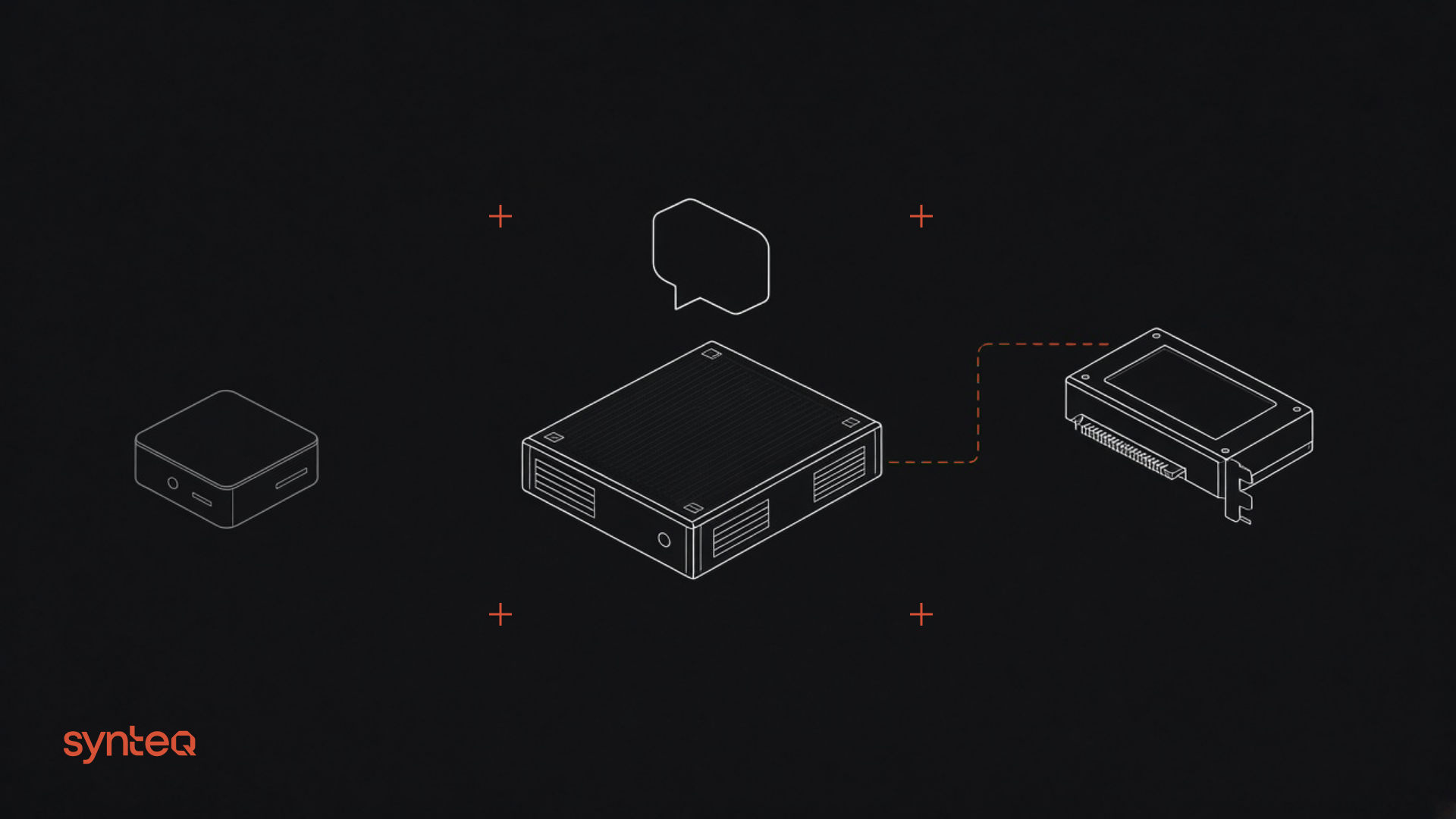
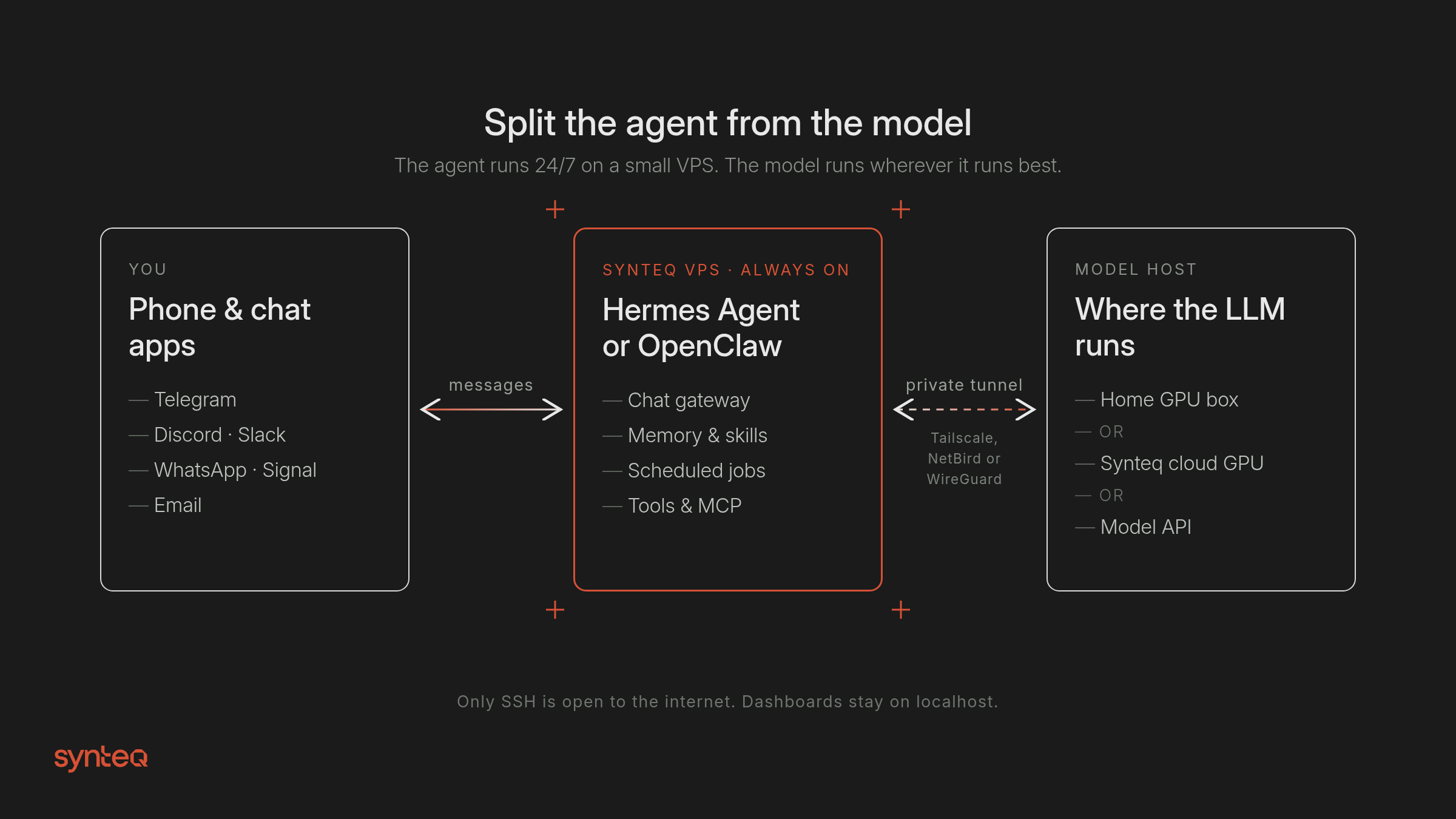
That's the idea behind this guide. A personal agent like Hermes Agent or OpenClaw is really two workloads:
- The agent host. The gateway process that stays connected to Telegram, Discord, Slack, or WhatsApp. It runs the scheduler, holds memory and skills, and calls tools. It has to be online all the time, but it needs very little compute.
- The model. The LLM that does the thinking. This is the heavy part, and it's the only part that benefits from a big GPU or a lot of unified memory.
Split them. Put the agent on a small, always-on VPS. Put the model wherever it runs best: an API, the GPU you already own at home, or a rented cloud GPU for the days you need more.
What Hermes Agent and OpenClaw actually are
- Hermes Agent is Nous Research's open-source (MIT) "self-improving" agent. It has a terminal UI, a single gateway process for Telegram, Discord, Slack, WhatsApp, Signal, and email, a built-in cron scheduler, persistent memory and skills, subagents, and MCP support. The README says you can "run it on a $5 VPS, a GPU cluster, or serverless infrastructure." It works with any OpenAI-compatible endpoint, including your own llama.cpp, vLLM, or Ollama server.
- OpenClaw (formerly Clawdbot/Moltbot) is an open-source assistant stewarded by the OpenClaw Foundation. One Gateway acts as the control plane for sessions, tools, and 20+ chat channels, with a web Control UI, a CLI, and a TUI. Its docs have a dedicated Linux server / VPS page, and models, including local ones via llama.cpp, vLLM, or Ollama, are swappable plugins.
Both are designed to run on a server. Neither requires Apple hardware for the agent itself.
Part 1: The physical build (the model side)
The VPS runs the agent. The table below covers where the model lives. Pick the tier that matches the hardware you already have.
Tier | Model host | What runs well | Notes |
|---|---|---|---|
0: API only | None. VPS alone. | Any hosted model (OpenRouter, Anthropic, OpenAI, Nous Portal, etc.) | The cheapest way to start. OpenClaw's local LLM inference doesn't fit in 1GB of RAM, so on tiny servers use API models. |
1: Pi 5 / N100 mini PC | A low-power box on your LAN | A second agent host or node. Small local models only. | The OpenClaw docs list a Pi 5 (4/8GB) as "Best" and set the minimum at 1GB RAM, 1 core, and 500MB of disk. Good for LAN automations. Not an LLM host. |
2: One 24GB GPU (used 3090+ class) | A desktop or tower you already own | Qwen3.8-27B at 4-bit (Unsloth lists 4-bit quants at 16–19GB total memory) | Community reports: ~28 tok/s on one 3090 at Q4_K_M (@chkn_little) and 65 tok/s on a 4090 with MTP (@analogalok). These are community numbers, not our tests. |
3: 128GB unified memory (Strix Halo-class mini PC) | A compact always-on box | Larger MoE models at high precision | Example: 53.6 tok/s with a 35B-A3B model at Q8 on a 128GB Framework Desktop (@sudoingX). |
4: Rent | Full-precision or long-context models, or several agents at once | RTX PRO 4000 24GB ($185/mo) up to RTX PRO 6000 96GB ($775/mo) and B300 288GB ($4,555/mo). |
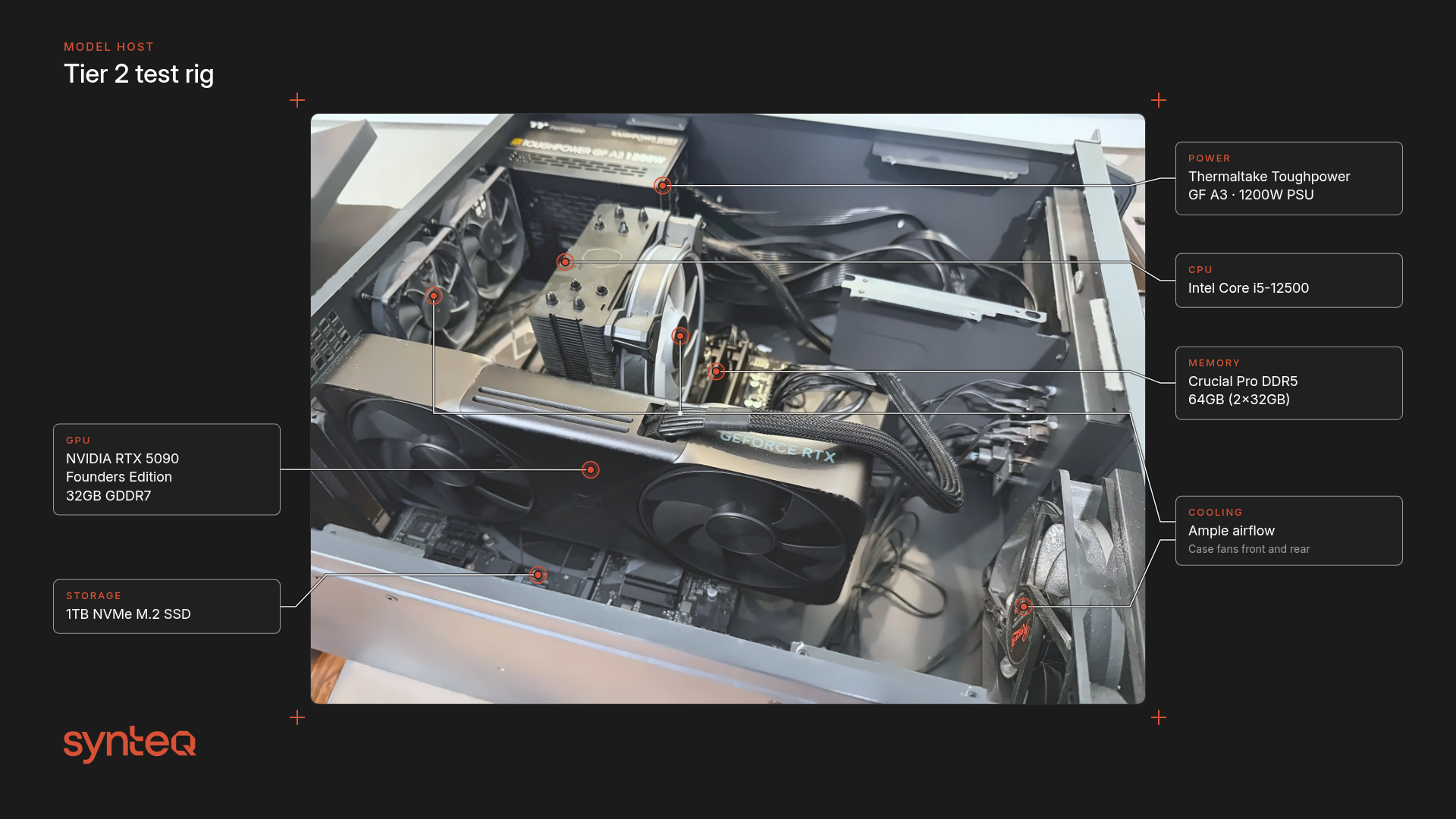
Build notes for Tier 2 (the "agent brain" box)
Most people reading this already own a gaming PC, and that's the point: you don't need to buy a Mac mini to host the agent.
- GPU: one 24GB card is the sweet spot for a 27B-class model at 4-bit with room for context. Hermes needs at least 64K tokens of context for tool use (per its providers docs), so budget VRAM for the KV cache as well as the weights. Post #4, the Qwen3.8-27B coding rig, covers the VRAM math in detail.
- PSU: leave headroom above the card's rated board power. Transient spikes on high-end cards are real.
- Placement: a model server that's always on belongs somewhere with airflow, like a closet shelf or a small rack, not under a desk. It only has to answer requests from your VPS over a private tunnel. Nothing on it gets exposed to the internet.
- Idle power: if the box runs 24/7, idle draw matters more than peak draw.
Part 2: Deploy the agent host on Synteq
Which VPS size?
Neither project publishes a single "minimum VPS" for the agent host with a remote model, so here's what the docs say:
- OpenClaw: the DigitalOcean guide runs a persistent Gateway on a 1 vCPU / 1GB droplet with a 2GB swapfile and recommends API models on that size. The Hetzner guide asks for at least 6GB RAM if you build the Docker image from source, and points smaller servers to the pre-built image.
- Hermes Agent: the README says "$5 VPS." The installer pulls Python 3.14, Node.js, ripgrep, FFmpeg, and by default a pinned Chromium for browser tools (installation docs). Browser automation is the memory-hungry part. Install with
--skip-browserif you don't need it.
A sensible starting point on Synteq is 2 vCPU / 4GB RAM / 40GB NVMe / 5TB bandwidth. On the VPS configurator that works out to $7.40/mo ($0.60 per Standard vCPU, $0.80 per GB of RAM, $0.05 per GB of NVMe, and $0.25 per TB of bandwidth beyond the first 5TB). You can resize later without rebuilding.
Location: pick the Synteq site closest to you and your model host: Dallas, Chicago, Spokane, or Valley Forge in the US, or Sofia for Europe. The agent adds a network hop to every model call, so keep it near the GPU. (If you plan to back up the agent to block storage in step 8, note that block storage attaches only within the same data center.)
Step 1: Order the VPS (portal, CLI, or API)
Option A: portal. In Synteq Cloud, click Order new → VPS, choose your spec, then pick a location, OS, hostname, and SSH key, and pay. This three-step flow (Plan → Configure → Payment) is documented in Creating a Resource. According to that page, most deployments take 5–10 seconds from a cached image. Ubuntu 22.04/26.04 and Debian 11/12/13 are among the available templates.
Option B: the Synteq CLI (fastest for developers). The official CLI shipped on Jul 9, 2026 (changelog). It needs Node.js 20+.
1# Install (or run once with: npx synteq)2npm install -g @synteq/cli34# Sign in through your browser (device-code flow)5synteq login67# Add your SSH public key to your account8synteq ssh-key add --name laptop --file ~/.ssh/id_ed25519.pub910# Look up plan, location, and image IDs11synteq catalog12synteq images1314# Order a VPS with the interactive custom-spec wizard (vCPU / RAM / NVMe sliders)15synteq order vps1617# ...or script it once you know the IDs, and block until it's running18synteq order vps --plan <PLAN_ID> --location <LOCATION_ID> --image <IMAGE_ID> \19 --ssh-key <SSH_KEY_ID> --payment-method <PAYMENT_METHOD_ID> --hostname agent-01 --wait2021# Get its IP22synteq vps details agent-01
synteq tui opens a full-screen dashboard with order, resource, and billing views if you'd rather click than type.
Option C: let your agent do it (API key + CLI or REST). This is where an agent host gets interesting: Hermes and OpenClaw can run shell commands, so with a scoped, IP-locked, expiring API key, your agent can check stock, price an order, and provision its own model server or backup volume.
- Create a key under API Keys → New API key in the portal (Creating an API Key). Choose the minimum scopes, lock it to your VPS's IP in the allowlist, and set an expiry. The key starts with
sk_and is shown once. - Give it to the CLI on the agent host:
1# On the agent VPS. Never paste real keys into chats or commit them.2export SYNTEQ_API_KEY="sk_REPLACE_WITH_YOUR_KEY"3echo "$SYNTEQ_API_KEY" | synteq login --with-token4synteq whoami56# CLI output defaults to JSON when piped, which is ideal for agents7synteq catalog -o json8synteq resources -o json
- Or call the REST API directly. The base URL is
https://api.cloud.synteq.com, auth is theX-API-Keyheader, and the full reference is in the portal's Interactive Docs and at cloud.synteq.com/docs/api:
1# Product catalog (plans, locations, images, stock)2curl -s https://api.cloud.synteq.com/orders/catalog \3 -H "X-API-Key: $SYNTEQ_API_KEY"45# Price an order without creating it (read-only)6curl -s -X POST https://api.cloud.synteq.com/orders/preview \7 -H "X-API-Key: $SYNTEQ_API_KEY" -H "Content-Type: application/json" \8 -d '{"kind":"virtualized","spec":{"custom_vcpu":2,"custom_ram_gb":4,"custom_disk_gb":40,9 "location_id":"<LOCATION_ID>","image_id":"<IMAGE_ID>","hostname":"agent-02"}}'
Guardrails worth copying. The public OpenAPI spec lets POST /orders run with no payment block. In that case the invoice is left open (invoice_only) until a human pays it. It also accepts a credit_only payment method. That gives you two clean patterns for an agent that can shop:
- Human-in-the-loop: the agent places the order with no payment block, and you approve it by paying the invoice.
- Prepaid budget: you load account credit (
synteq credits add) and the agent can only order withcredit_only, so it can never spend more than the balance.
Pair either one with Hermes's command-approval settings (security docs) or OpenClaw's sandboxing, so the agent asks before it runs anything that costs money.
Step 2: Harden the box (5 minutes)
1ssh root@<VPS_IP>2adduser agent && usermod -aG sudo agent3rsync --archive --chown=agent:agent ~/.ssh /home/agent4# Then, as agent:5sudo apt update && sudo apt -y upgrade6sudo apt -y install ufw fail2ban git curl7sudo ufw allow OpenSSH8sudo ufw enable
Both projects keep their web dashboards on loopback by default: Hermes's hermes dashboard binds 127.0.0.1:9119, and OpenClaw's Gateway binds loopback on port 18789. So the only public port you need is SSH. OpenClaw's VPS page says it directly: "keep the Gateway on loopback and access it via SSH tunnel or Tailscale Serve."
Step 3: Put the VPS and your model host on one private network
Use Tailscale, NetBird, or plain WireGuard. Here's the Tailscale version (Linux install docs); run it on both the VPS and the GPU box:
1curl -fsSL https://tailscale.com/install.sh | sh2sudo tailscale up3tailscale ip -4 # note each machine's 100.x address
Want no third-party coordinator at all? Post #2 in this series, the no-open-ports homelab, runs a self-hosted NetBird or Pangolin control plane on a VPS instead.
Step 4: Serve the model on your GPU box (private IP only)
This uses llama.cpp's llama-server, which exposes an OpenAI-compatible /v1 API. Build it with CUDA (commands from Unsloth's Qwen3.8 guide):
1sudo apt-get install -y pciutils build-essential cmake curl libcurl4-openssl-dev2git clone https://github.com/ggml-org/llama.cpp3cmake llama.cpp -B llama.cpp/build -DBUILD_SHARED_LIBS=OFF -DGGML_CUDA=ON4cmake --build llama.cpp/build --config Release -j --clean-first --target llama-server
Download a 4-bit Qwen3.8-27B GGUF (UD-Q4_K_XL is 17.56GB in the Unsloth repo) and serve it on the tunnel IP only. Set context to at least 64K for Hermes:
1pip install -U "huggingface_hub[cli]"2hf download unsloth/Qwen3.8-27B-GGUF --local-dir models/qwen38 --include "*UD-Q4_K_XL*"34./llama.cpp/build/bin/llama-server \5 -m models/qwen38/Qwen3.8-27B-UD-Q4_K_XL.gguf \6 --alias qwen38-27b --jinja -fa on -ngl 99 -c 65536 \7 --host <GPU_BOX_TAILNET_IP> --port 8080
Hermes's llama.cpp notes say to set -c explicitly, since the default can try to allocate the model's full 256K training context and run out of memory. They also warn that parallel slots (-np) split the context. Keep one slot per agent session at 64K or more.
Step 5: Install the agent on the VPS and point it at your model
Hermes Agent (install, custom endpoints):
1curl -fsSL https://hermes-agent.nousresearch.com/install.sh | bash2# add --skip-browser after "bash -s --" if you don't need browser tools3source ~/.bashrc4hermes model # choose "Custom endpoint (self-hosted / VLLM / etc.)"5 # URL: http://<GPU_BOX_TAILNET_IP>:8080/v1 key: (blank) model: qwen38-27b6hermes doctor
Or set it in ~/.hermes/config.yaml:
1model:2 default: qwen38-27b3 provider: custom4 base_url: http://<GPU_BOX_TAILNET_IP>:8080/v15 context_length: 6553667# Optional: fall back to an API model if the home GPU is offline8fallback_providers:9 - provider: openrouter10 model: <MODEL_ID>
OpenClaw (install, existing llama-server):
1curl -fsSL https://openclaw.ai/install.sh | bash # starts onboarding automatically2# or, if you manage Node yourself (Node 24.16+ or 26.1+):3# npm install -g openclaw@latest --allow-scripts=openclaw && openclaw onboard --install-daemon45# Non-interactive: point OpenClaw at your existing llama-server6openclaw onboard --non-interactive --accept-risk \7 --auth-choice llama-cpp-existing-server \8 --custom-base-url http://<GPU_BOX_TAILNET_IP>:8080/v1 \9 --custom-model-id qwen38-27b1011openclaw gateway status
OpenClaw trusts custom providers on loopback, LAN, and tailnet addresses, and its local-models page covers context-window checks and Tool Search for smaller local models.
Step 6: Connect chat apps and make it survive reboots
Hermes:
1hermes gateway setup # Telegram, Discord, Slack, WhatsApp, Signal, email2hermes gateway install # systemd user service3sudo loginctl enable-linger $USER # keep it running after you log out / at boot4hermes gateway status
Lock down who can talk to it. Hermes supports DM pairing and allowlists such as TELEGRAM_ALLOWED_USERS=<your id> in ~/.hermes/.env (security docs).
OpenClaw: openclaw onboard --install-daemon already installed a systemd user unit (openclaw-gateway.service). Add channels from the Control UI.
Reach the dashboards privately from your laptop over SSH:
1ssh -N -L 9119:127.0.0.1:9119 agent@<VPS_IP> # Hermes dashboard → http://127.0.0.1:91192ssh -N -L 18789:127.0.0.1:18789 agent@<VPS_IP> # OpenClaw Control UI → http://127.0.0.1:18789
Step 7: Add scheduled jobs
Hermes ships a cron scheduler that delivers to any connected platform (cron docs). Describe the job in plain language, for example "every weekday at 7:30 send me a briefing of my calendar and top unread email," and pick the destination.
Step 8: Back up the agent's brain
Memory, skills, sessions, and credentials live in ~/.hermes/ (Hermes) and ~/.openclaw/ (OpenClaw). Snapshot them nightly:
1hermes backup --quick -o ~/backups/hermes-$(date +%F).zip # config, state.db, .env, auth, cron
Then copy the archives off the box with restic. Post #3 covers a restic/Kopia target on $4/TB block storage. If the agent VPS is in Dallas, you can attach a volume directly:
1synteq storage order --name agent-backups --size 1024 --location <DALLAS_LOCATION_ID> \2 --attach-resource <AGENT_VPS_RESOURCE_ID> --payment-method <PAYMENT_METHOD_ID>
(Volumes are sold from 1TB, at $4.00 per TB-month, and attach only to servers in the same data center. See /storage.)
Step 9 (optional): Swap the home GPU for a Synteq cloud GPU
On a trip, during a heat wave, or when you want the 96GB model: order a cloud GPU in the same site as your agent, join it to the same tailnet, run the same llama-server command, and change one line (base_url) in the agent config.
1synteq order gpu # interactive picker of GPU Cloud plans2# or: synteq gpu order --plan <GPU_PLAN_ID> --location <LOCATION_ID> --image <IMAGE_ID> --ssh-key <SSH_KEY_ID> --payment-method <PAYMENT_METHOD_ID> --wait
Every Synteq cloud GPU is a full card passed through to a dedicated VDS, with no sharing and no time-slicing (/gpu/cloud). If you need the whole machine, see GPU Metal.
What people actually use this for
- Daily briefing agent: cron plus a chat delivery. Calendar, weather, inbox triage, and top headlines.
- Inbox and ticket triage: summarize, label, and draft replies for approval.
- Homelab ops: "check that last night's backups ran and tell me if a container restarted." The agent is on the same private network as your servers.
- Browser automation: fill forms or scrape your own dashboards. This is the feature that needs more VPS RAM.
- Self-provisioning: "spin up a GPU box for tonight's batch job and send me the invoice." That's the Synteq CLI/API flow from Step 1, with a human approval gate.
Cost at a glance
Setup | Monthly cost | Notes |
|---|---|---|
Synteq VPS (2 vCPU / 4GB / 40GB / 5TB) + API model | $7.40 + API usage | No home hardware. |
Synteq VPS + your existing gaming PC as the model host | $7.40 + your electricity | Heat/noise, but minimal ongoing costs if you already have a GPU. |
Synteq VPS + Synteq RTX PRO 4000 24GB cloud GPU | $7.40 + $185 | 24GB fits Qwen3.8-27B 4-bit with context. |
Synteq VPS + Synteq RTX PRO 6000 96GB cloud GPU | $7.40 + $775 | Q8/BF16 or long context, several agents. |
We don't list a Mac mini price here. Apple pricing and availability have moved a lot this year, so check current prices yourself.
Frequently Asked Questions
No. Both agents run on Linux servers. OpenClaw has an official Linux/VPS guide, and Hermes says it runs on a "$5 VPS." A big machine only matters if you want to run the model locally, and that can be any GPU box or a cloud GPU.
Hermes installs Python 3.14, Node.js, and by default a Chromium for browser tools. We suggest starting at 2 vCPU and 4GB RAM, or smaller if you install with --skip-browser and use a remote model. Hermes requires at least 64K tokens of model context for tool use.
OpenClaw's can run the Gateway on a 1GB server with a 2GB swapfile, using API models. Local LLM inference doesn't fit in 1GB. Building the Docker image from source needs about 6GB RAM, so use the pre-built image on small servers.
Run llama-server (or Ollama) on your GPU machine, then run hermes model, choose "Custom endpoint," and enter the server's /v1 URL. For Ollama, raise the context to at least 64K with OLLAMA_CONTEXT_LENGTH, because Ollama's default is much lower on smaller GPUs.
Keep it private. Hermes binds its dashboard to 127.0.0.1:9119 and OpenClaw binds its Gateway to loopback on port 18789 by default. Reach them over an SSH tunnel or a private tailnet, and allowlist who can message the bot.
Yes, with guardrails. Create a scoped Synteq API key with an IP allowlist and an expiry, log the Synteq CLI in with synteq login --with-token, and let the agent use synteq catalog and synteq order. Leave orders unpaid for human approval, or limit the agent to prepaid credit.
Close to your model host. Synteq runs VPS in Dallas, Chicago, Spokane, Valley Forge, and Sofia. If you want to attach block storage for backups, deploy in Dallas for now.